开始下载
- 软件大小: 2.30MB
- 软件语言: 简体中文
- 软件类别: 国产软件 / 绿色版 / 游戏工具
- 运行环境: Win9x/NT/2000/XP/win7/win8/
- 软件更新: 2016-8-4 9:45:01
- 解压密码: www.edowning.net
- 下载次数: 0
- 软件评级:

- 本站推荐:
软件介绍
辐射避难所存档修改器 辐射避难所手机存档全功能修改器
辐射避难所最新1.6.1存档修改器,连宠物属性都能修改,适用于PC版、安卓版,基本涵盖了所有能修改的地方。友情提示:过度修改严重减低游戏乐趣,慎用!
*注意:
1.需要NET 4.5 to run.
2.作者原话,安卓手机用户请仔细看第二部分!
Supported version of the game: 1.6.1
How to use?
{The first method. Simplified version}
1) Start your editor on the PC.
2) Select the vault you want to edit.
3) Edit.
4) Save.
{Second method. All functions}
1) Start your editor on the PC. 打开pc存档编辑器
2) Select the vault and click "Remote Edit" 选择存档后点击”Remote Edit"
3) Start FSSE (Version v1.4.2) on your device based on Android (it is available in the archive .apk file).打开FSSE(v1.4.2)在安卓设备(附件里的APK)
4) Select the remote editing and enter the IP, as shown in the editor, or scan the QR-code on the screen.选择“”Remote Edit“”和输入IP,在编辑器中显示,或扫描屏幕上的二维码。
5) Edit the Vault in your phone.在手机中编辑你的存档
6) Save the changes and wait until the editor FSSE Win и FSSE Android do not finish their work.保存编辑,等待完成
附件中有一APK,作者意思是可以修改Android设备上的存档,但楼主无Android设备,请大家按照作者意图测试是否可以修改Android版本,是否需要root权限不清楚。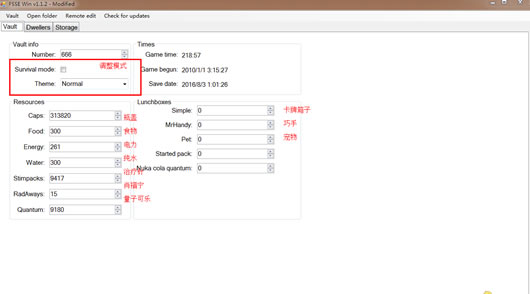
下载地址

相关软件
帮助说明
- 请一定升级到最新版[WinRAR],如果不能下载,请点击报告错误,如有其它问题,欢迎发信联系管理员
- 如何查看系统是32位还是64位的教程
- 安装打印机驱动时提示“确认打印机已连接”的问题解决教程
- 驱动程序在安装时没有数字签名的解决教程